> For the complete documentation index, see [llms.txt](https://docs-conversational-ai.syntphony.com/llms.txt). Markdown versions of documentation pages are available by appending `.md` to page URLs; this page is available as [Markdown](https://docs-conversational-ai.syntphony.com/studio/flows/conversational-flows.md).

# Conversational Flows

Understand how each type of conversational flow works and when to use it to structure your conversational experience.

The sequences of cells inside the Workspace are called conversational flows. They're part of your virtual agent's knowledge base. Before building your flow, it's important to learn about all the components that are part of the dialog.

Inside the Dialog Manager, you can find the following sections:

* **Workspace:** where the flows are built
* **Repositories:** store the flows and cells (Intents, Entities, Services, and Answers) created in the Workspace
* **Training:** place to train the virtual agent and check previous trainings.

To start building your virtual agent, you will have to choose a flow. These are the four types available in Syntphony CAI:

* [**Welcome**](https://docs-conversational-ai.syntphony.com/build-dialogs/flows#welcome)
* [**Not Expected**](https://docs-conversational-ai.syntphony.com/build-dialogs/flows#not-expected)
* [**User Journey**](https://docs-conversational-ai.syntphony.com/build-dialogs/flows#user-journey)
* [**Jump**](https://docs-conversational-ai.syntphony.com/build-dialogs/flows#jump)

Let's learn more about them!

***

## Welcome&#x20;

This is an **optional** flow with one or more cells. For starters, you may find it easier to open a dialog with greetings in a welcome flow.

You can start your Welcome flow with a simple Answer (that can be evaluable or transactional), Rule, Code, or Service cell. After these, you can add any of the cells available in the Dialog Manager, including Intent, Entity, Input, Jump, and the End cell, as it may be a reusable flow.

The Welcome flow can be useful in different ways, depending on the channel being used and the business needs.

#### **App**

If your virtual agent is using an app channel, where the user is already logged in, this flow can help segment different user groups through rule cells, for example, which will allow you to deliver a different welcome message for each group.

<figure><img src="https://content.gitbook.com/content/n6zS4HeuuVpRHZEvDiFU/blobs/4sjB35T4I2wQw8Zaci8E/image.png" alt="" width="563"><figcaption></figcaption></figure>

#### **WhatsApp**

Now, if the channel doesn’t start the dialog and depends on the user input to start a conversation (like in the WhatsApp case), the welcome flow can aim to query, using a service cell, the customer's telephone number, identify its segment and disambiguate it to deliver different answers.

<figure><img src="https://content.gitbook.com/content/n6zS4HeuuVpRHZEvDiFU/blobs/ls3VtdClZ2EXmc8LGJzR/image.png" alt="" width="563"><figcaption></figcaption></figure>

#### **Web**

In web channels, the welcome flow can aim to change the behavior of the channel, using cell code, and store user information from *open* to *hidden context*. In sequence, the virtual agent delivers sequential responses to the user.

<figure><img src="https://content.gitbook.com/content/n6zS4HeuuVpRHZEvDiFU/blobs/308JkddJvxGhrDhizkbh/image.png" alt="" width="563"><figcaption></figcaption></figure>

***

### Not Expected&#x20;

The not expected flow is a fallback answer (also known as idk) executed when the virtual agent doesn’t understand the user’s context. It works as a miniflow with one or more cells. **It’s mandatory and cannot be deleted**.

#### **Custom answers**

<div><figure><img src="https://content.gitbook.com/content/n6zS4HeuuVpRHZEvDiFU/blobs/cjgq712i80GApakyjDMr/image.png" alt="" width="563"><figcaption><p>Using Rule cells to deliver segmented Not Expected answers</p></figcaption></figure> <figure><img src="https://content.gitbook.com/content/n6zS4HeuuVpRHZEvDiFU/blobs/mbWiNBbitJYUcnlcl7B5/idk%20segmentado.png" alt=""><figcaption><p>Using Service cell to identify users and deliver custom answers</p></figcaption></figure></div>

It’s also possible to query the costumers' segment to custom the answers by its segment (if it’s a regular costumer or premium, for example) using a Service cell.

You can also use Code cells to remember how many times the user has gone through a certain flow and then use Rule cells to disambiguate and deliver variable answers.&#x20;

<figure><img src="https://content.gitbook.com/content/n6zS4HeuuVpRHZEvDiFU/blobs/qEtZN1mjjsLJ7mZdZPx5/image.png" alt="" width="563"><figcaption></figcaption></figure>

Learn how to [**create variable answers with Code and Rule cells**](https://docs-conversational-ai.syntphony.com/build-dialogs/workspace-cells/rule/variable-answers-using-code-and-rule-cells.md).

***

## User Journey&#x20;

More robust option for building the dialog with all the conversational tools that Syntphony CAI has to offer. It must start with an Intent cell, whether it is new or from the list, in this cases Syntphony CAI searches on the repository for intents that had already been created.

For a better performance, **we recommend to not exceed 100 cells in one dialog flow**. If you need to add more cells, you can either create new flows and use the [**Jump**](https://docs-conversational-ai.syntphony.com/build-dialogs/workspace-cells/jump.md) function. 😉

***

## Jump Flow

This can be a complementary flow. Some flows may use a common journey, like for example when you need to validate or register a user, which may be needed in different flows such as open a ticket, follow its status, to cancel it, or even to leave a suggestion or a complaint.

Instead of repeating the same cells in all these flows, you can simplify it by just adding a Jump cell that will lead to the Jump flow “user\_validation”. After what, it will go back to the original flow, by default, and continue from there.

Example: In the image below, we used a Code and Rule cells to disambiguate the flow when users try to reach for a human assistance during business hour and after that.

<figure><img src="https://content.gitbook.com/content/n6zS4HeuuVpRHZEvDiFU/blobs/ZhsOGypXTwWfPHi3aL9p/image.png" alt="" width="563"><figcaption></figcaption></figure>

In the first case, an End cell was added after the "talk\_agent" answer cell. If users follow this route, the flow stops there. Whereas, if they go through the other path, they will go back to the origin flow.

{% hint style="info" %}
If you don't want the conversation to go back to the origin flow after the jump cell, simply add an [**End cell**](https://docs-conversational-ai.syntphony.com/build-dialogs/workspace-cells/end.md) to the Jump flow where you want it to end. **Important:** if you have other cells in your origin flow after the jump cell, they won't be delivered.
{% endhint %}

When you jump to a User Journey flow, the first cell, an Intent, is ignored. If you need to use this Intent, add it to the origin flow.

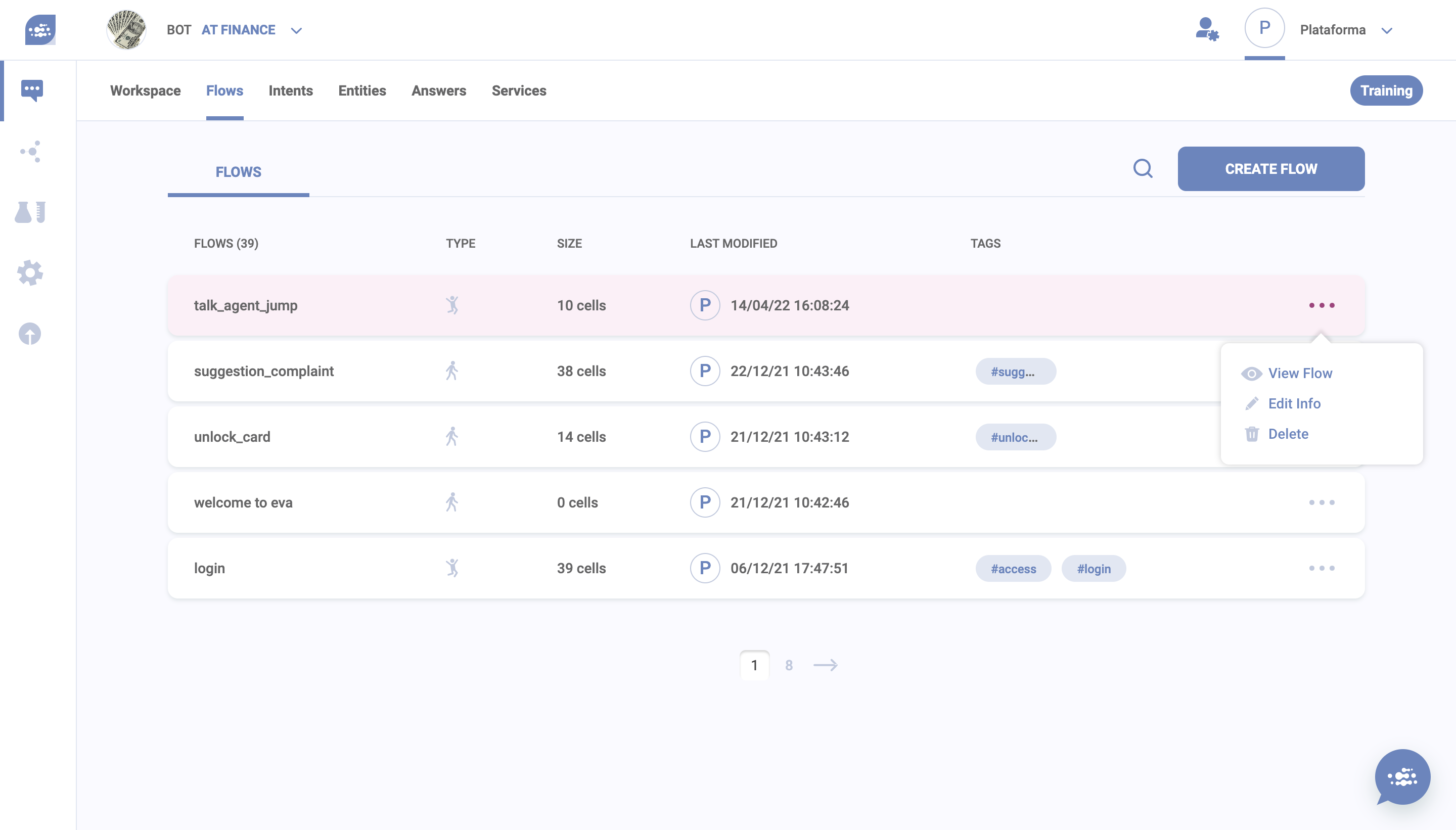
Any flow can be edited (pencil icon) and deleted (trash can icon).

<img src="https://content.gitbook.com/content/n6zS4HeuuVpRHZEvDiFU/blobs/4G0IvPVCOZ1EY230CiaW/2%20what%20are%20dialog%20flows.png" alt="You can access any created flow by clicking on the eye icon" width="563">

{% hint style="info" %}
**Important:** Deleting a flow is an irreversible action.&#x20;
{% endhint %}


---

# Agent Instructions
This documentation is published with GitBook. GitBook is the documentation platform designed so that both humans and AI agents can read, navigate, and reason over technical content effectively. Learn more at gitbook.com.

## Querying This Documentation
If you need additional information that is not directly available in this page, you can query the documentation by asking a question.

Perform an HTTP GET request on the following URL with the `ask` and `goal` query parameters:

```
GET https://docs-conversational-ai.syntphony.com/studio/flows/conversational-flows.md?ask=<question>&goal=<user_goal>
```

`ask` is the immediate question: it should be specific, self-contained, and written in natural language.
`goal` is what the user is ultimately trying to achieve, the reason they need the answer. Sharing it helps GitBook give you a better, more relevant answer. A goal is most helpful when it describes the outcome the user wants rather than restating the question. For example, with `ask=how do I create an API token`, a goal like `automate deployments from our CI pipeline` lets GitBook tailor the answer to that use case.

The response will contain a direct answer to the question and relevant excerpts and sources from the documentation.

Use this mechanism when the answer is not explicitly present in the current page, you need clarification or additional context, or you want to retrieve related documentation sections.