> For the complete documentation index, see [llms.txt](https://docs-conversational-ai.syntphony.com/llms.txt). Markdown versions of documentation pages are available by appending `.md` to page URLs; this page is available as [Markdown](https://docs-conversational-ai.syntphony.com/syntphony-live-agent-console/supervisor-workspace/settings.md).
# Settings
Customization center for platform settings and operational parameters.
## Settings
### Purpose
Configure global behavior for conversations, assignment, handover routing, and agent productivity tools.
### Who this is for
Administrators and supervisors who configure operational rules for the Live Agent Console.
### Prerequisites
* You have supervisor or admin access.
* At least one source is configured in [Teams Tab](/syntphony-live-agent-console/supervisor-workspace/index/set-up-a-new-source.md).
### Steps
#### Configure global settings
Use the **General Settings** tab to control chat capacity, inactivity behavior, transfers, collaboration, localization, and related options.
Settings are grouped into three tabs:
* **General Settings**: Operational behavior (see the sections below), plus timing and messaging for inactivity, transfers, collaboration, sound toggle visibility, and system language.
* **Quick Responses**: Predefined replies for faster agent interactions.
* **Conversation Tags**: Tags available to classify and track chats.
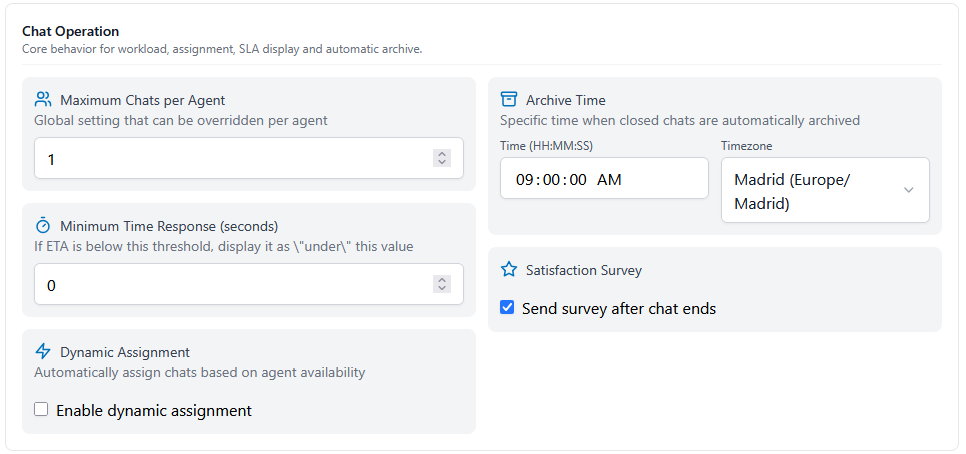
**Chat Operation**
Core behavior for workload, assignment, SLA display, and automatic archive.
Chat Operation
| Setting | Description |
| ----------------------------------- | --------------------------------------------------------------------------------------------------------------- |
| **Maximum Chats per Agent** | Global cap on simultaneous chats per agent. Can be overridden per agent where supported. |
| **Minimum Time Response (seconds)** | If an estimated response time is below this value, the UI shows it as “under” this threshold. |
| **Dynamic Assignment** | When **Enable dynamic assignment** is on, chats are assigned automatically based on agent availability. |
| **Archive Time** | Daily time (`HH:MM:SS`) and **Timezone** when closed chats are moved to archive automatically. |
| **Satisfaction Survey** | When **Send survey after chat ends** is enabled, customers receive the post-chat survey after the session ends. |
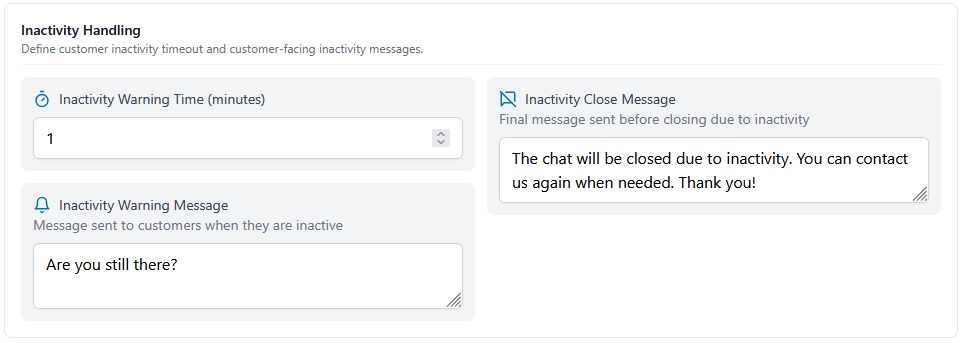
**Inactivity Handling**
Define how long a customer can be idle before warnings and closure, and which messages they see.
Inactivity Handling
| Setting | Description |
| ------------------------------------- | ------------------------------------------------------------------------- |
| **Inactivity Warning Time (minutes)** | How long the customer stays inactive before the first warning is sent. |
| **Inactivity Warning Message** | Customer-facing text sent when the warning time is reached. |
| **Inactivity Close Message** | Final customer-facing text sent before the chat is closed for inactivity. |
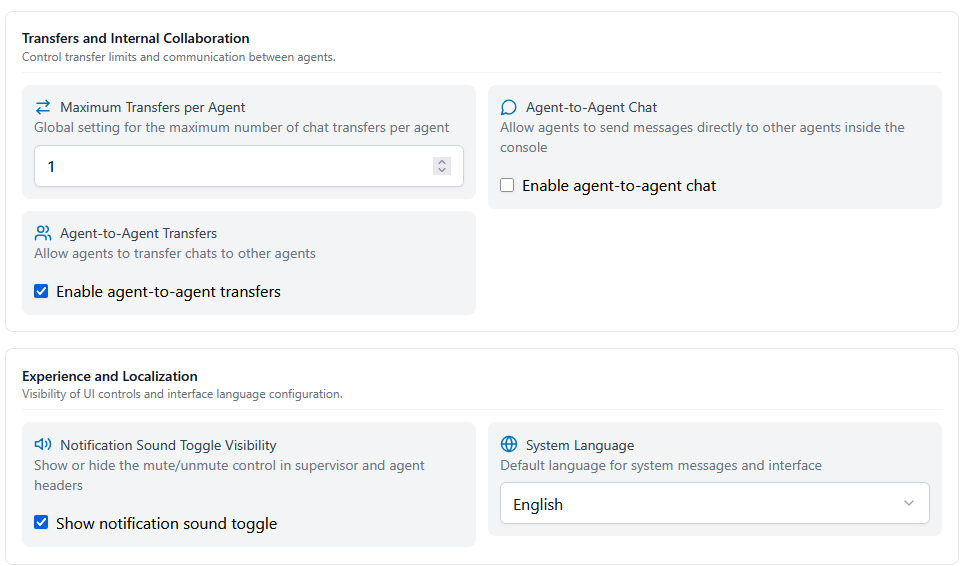
**Transfers and Internal Collaboration**
Control transfer limits and whether agents can hand off chats or message each other inside the console.
Transfers and Internal Collaboration (top) and Experience and Localization (bottom)
| Setting | Description |
| ------------------------------- | ------------------------------------------------------------------------------------------- |
| **Maximum Transfers per Agent** | Global maximum number of chat transfers per agent. |
| **Agent-to-Agent Transfers** | **Enable agent-to-agent transfers** allows agents to transfer active chats to other agents. |
| **Agent-to-Agent Chat** | **Enable agent-to-agent chat** allows direct agent-to-agent messaging inside the console. |
**Experience and Localization**
These options appear in the same view as transfers and collaboration (see the figure above).
| Setting | Description |
| ---------------------------------------- | ----------------------------------------------------------------------------------------------------------------------------------------------------------------------------------------- |
| **Notification Sound Toggle Visibility** | **Show notification sound toggle** controls whether the mute/unmute control appears in supervisor and agent headers. If the toggle is hidden, notification sound stays **on by default**. |
| **System Language** | Default language for system messages and the interface (for example **English**). |
## Create quick responses
Quick responses provide a library of pre-written templates that agents can insert during customer conversations.
Once quick responses are defined, they appear in the agent chat menu and can be inserted into the chat input with one click.
## Chat tags
The agent can add tags to a chat by using the Tags button at the top right of the conversation window.
When entering handover, the chat automatically acquires the "handover" tag as part of the tracking ecosystem.
The available tags for the agents can be defined by the supervisor in the settings section:
### Expected outcome
* Agents work with consistent assignment and productivity settings.
* Source-level handover schedules are configured from [Teams Tab](/syntphony-live-agent-console/supervisor-workspace/index/set-up-a-new-source.md).
### Related pages
* [Teams Tab](/syntphony-live-agent-console/supervisor-workspace/index.md)
* [Agent Workspace](/syntphony-live-agent-console/agent-console/index.md)
* [Dashboard](/syntphony-live-agent-console/supervisor-workspace/index-1.md)
* [Archived Tab](/syntphony-live-agent-console/supervisor-workspace/archived-tab.md)
* [What's New](/syntphony-live-agent-console/whats-new.md)
---
# Agent Instructions
This documentation is published with GitBook. GitBook is the documentation platform designed so that both humans and AI agents can read, navigate, and reason over technical content effectively. Learn more at gitbook.com.
## Querying This Documentation
If you need additional information that is not directly available in this page, you can query the documentation by asking a question.
Perform an HTTP GET request on the following URL with the `ask` and `goal` query parameters:
```
GET https://docs-conversational-ai.syntphony.com/syntphony-live-agent-console/supervisor-workspace/settings.md?ask=&goal=
```
`ask` is the immediate question: it should be specific, self-contained, and written in natural language.
`goal` is what the user is ultimately trying to achieve, the reason they need the answer. Sharing it helps GitBook give you a better, more relevant answer. A goal is most helpful when it describes the outcome the user wants rather than restating the question. For example, with `ask=how do I create an API token`, a goal like `automate deployments from our CI pipeline` lets GitBook tailor the answer to that use case.
The response will contain a direct answer to the question and relevant excerpts and sources from the documentation.
Use this mechanism when the answer is not explicitly present in the current page, you need clarification or additional context, or you want to retrieve related documentation sections.