> For the complete documentation index, see [llms.txt](https://docs-conversational-ai.syntphony.com/llms.txt). Markdown versions of documentation pages are available by appending `.md` to page URLs; this page is available as [Markdown](https://docs-conversational-ai.syntphony.com/syntphony-messaging-portal/messaging-tools/administration/source-configuration.md).
# Source Configuration
## Purpose
Create and configure channel **sources** that define how traffic enters Syntphony Messaging and where it is routed—whether to a bot in the portal, a WebChat widget, or an **external HTTPS endpoint** (WhatsApp Forward).
## Source types
| Type | Use when |
| -------------------- | --------------------------------------------------------------------------------------------------------------------------------------------------------------------------------------------------------------------------------- |
| **Widget** | WebChat on your website; routes to a bot and optional [Source Theme](/syntphony-messaging-portal/messaging-tools/administration/source-theme.md). |
| **WhatsApp** | WhatsApp handled in the portal; routes from a phone number to a [Bots Configuration](/syntphony-messaging-portal/messaging-tools/administration/bots-configuration.md) destination. |
| **WhatsApp Forward** | WhatsApp events are **forwarded** to an external system (for example AWS API Gateway). See [WhatsApp Forward source](/syntphony-messaging-portal/messaging-tools/administration/source-configuration/whatsapp-forward-source.md). |
## Prerequisites
* For **WhatsApp** and **WhatsApp Forward**: [Phone Configuration](/syntphony-messaging-portal/messaging-tools/administration/phone-configuration.md) is complete for the number you will use.
* For **WhatsApp** and **Widget**: a bot is available in [Bots Configuration](/syntphony-messaging-portal/messaging-tools/administration/bots-configuration.md).
* For **WebChat**: a [Source Theme](/syntphony-messaging-portal/messaging-tools/administration/source-theme.md) is recommended before go-live.
* Permissions to manage administration settings in the Messaging Portal.
## Configuration order
Complete administration assets in this order when setting up a new environment:
1. [Bots Configuration](/syntphony-messaging-portal/messaging-tools/administration/bots-configuration.md) (required for Widget and standard WhatsApp sources)
2. [Phone Configuration](/syntphony-messaging-portal/messaging-tools/administration/phone-configuration.md) (WhatsApp and WhatsApp Forward)
3. [Source Theme](/syntphony-messaging-portal/messaging-tools/administration/source-theme.md) (WebChat branding, optional but recommended)
4. **Source Configuration** (this page)
For **WhatsApp Forward** integrations only, steps 1 and 3 can be skipped; you still need step 2 before creating the forward source.
## Create a source (general steps)
1. Open **Administration → Source Configuration** and start **Create Source**.
2. Enter **Source Name** and optional **Description**.
3. Select **Type** (Widget, WhatsApp, or WhatsApp Forward).
4. Complete fields for the selected type:
* **Widget**: widget configuration and destination bot; assign a [Source Theme](/syntphony-messaging-portal/messaging-tools/administration/source-theme.md) when available.
* **WhatsApp**: origin phone number and destination bot.
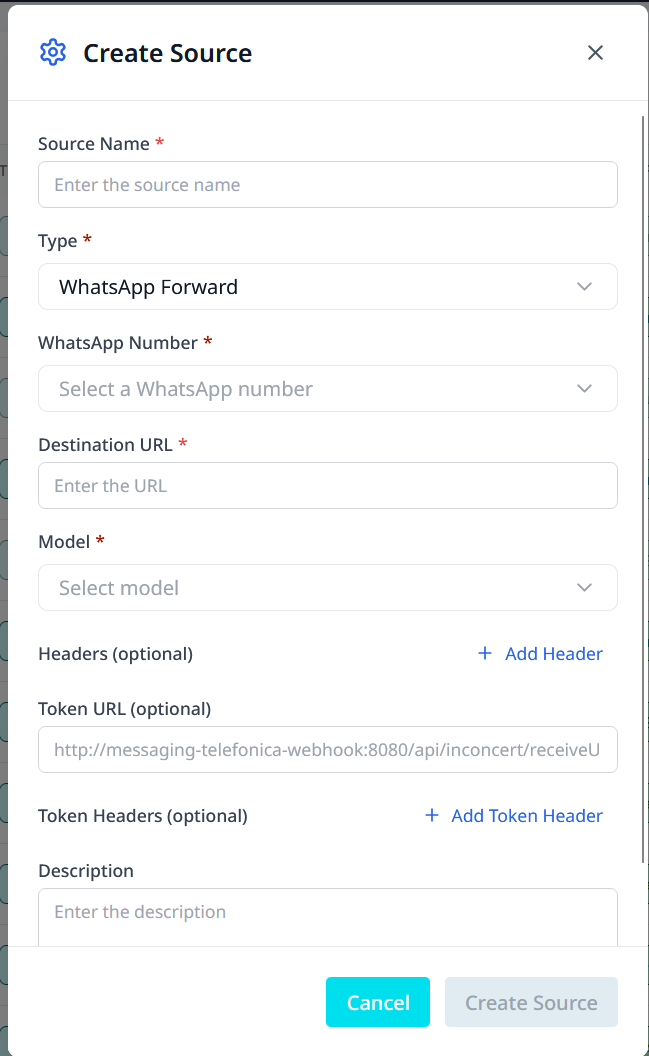
* **WhatsApp Forward**: phone number, **Destination URL**, **Model**, and optional headers/token settings — full reference in [WhatsApp Forward source](/syntphony-messaging-portal/messaging-tools/administration/source-configuration/whatsapp-forward-source.md).
Create Source — WhatsApp Forward type (external forwarding)
5. For **WhatsApp** and **Widget** sources only: if your operational model requires it, enable **Console Direct** so handover attempts go directly to the Live Agent Console without contacting a bot first.
6. Save the source.
7. Validate the created source:
* **Widget**: installation widget script and theme.
* **WhatsApp**: linked phone and bot are active.
* **WhatsApp Forward**: destination URL responds over HTTPS and receives test events (see [WhatsApp Forward source](/syntphony-messaging-portal/messaging-tools/administration/source-configuration/whatsapp-forward-source.md)).
## Configure handover schedule by source
Applies to sources that use portal routing (**Widget** and standard **WhatsApp**), not WhatsApp Forward.
1. Open the source in edit mode.
2. Enable the schedule option for the source.
3. Select the source timezone.
4. Add one or more time ranges.
5. Save the source.
Schedule behavior:
* You can define multiple ranges (for example, `08:00-14:00` and `15:00-19:00`).
* Each new range must start after the previous range ends.
* The full-stop option to disable handover for the source overrides schedule ranges and blocks all handovers.
* You can configure a custom message shown to end users when handover is unavailable.
## Operational notes
* Source routing defines how conversations move from channel origin to their destination.
* **WebChat**: routing uses the selected destination bot.
* **WhatsApp**: routing uses the selected origin phone and destination bot.
* **WhatsApp Forward**: routing leaves the portal; events go to the configured **Destination URL**. Outbound replies typically use the Syntphony Messaging API from your external platform.
* Use **Console Direct** on bot-routed sources when handover should skip the bot-contact attempt.
## Expected outcome
* A functional source is available for Communication and routing (or forwarding) as designed.
* Each source type is mapped to the correct channel assets.
* WhatsApp Forward sources deliver events to the external endpoint documented in [WhatsApp Forward source](/syntphony-messaging-portal/messaging-tools/administration/source-configuration/whatsapp-forward-source.md).
## Related pages
* [WhatsApp Forward source](/syntphony-messaging-portal/messaging-tools/administration/source-configuration/whatsapp-forward-source.md)
* [Administration](/syntphony-messaging-portal/messaging-tools/administration.md)
* [Phone Configuration](/syntphony-messaging-portal/messaging-tools/administration/phone-configuration.md)
* [Bots Configuration](/syntphony-messaging-portal/messaging-tools/administration/bots-configuration.md)
* [Source Theme](/syntphony-messaging-portal/messaging-tools/administration/source-theme.md)
* [Dashboard](/syntphony-messaging-portal/dashboard.md)
---
# Agent Instructions
This documentation is published with GitBook. GitBook is the documentation platform designed so that both humans and AI agents can read, navigate, and reason over technical content effectively. Learn more at gitbook.com.
## Querying This Documentation
If you need additional information that is not directly available in this page, you can query the documentation by asking a question.
Perform an HTTP GET request on the following URL with the `ask` and `goal` query parameters:
```
GET https://docs-conversational-ai.syntphony.com/syntphony-messaging-portal/messaging-tools/administration/source-configuration.md?ask=&goal=
```
`ask` is the immediate question: it should be specific, self-contained, and written in natural language.
`goal` is what the user is ultimately trying to achieve, the reason they need the answer. Sharing it helps GitBook give you a better, more relevant answer. A goal is most helpful when it describes the outcome the user wants rather than restating the question. For example, with `ask=how do I create an API token`, a goal like `automate deployments from our CI pipeline` lets GitBook tailor the answer to that use case.
The response will contain a direct answer to the question and relevant excerpts and sources from the documentation.
Use this mechanism when the answer is not explicitly present in the current page, you need clarification or additional context, or you want to retrieve related documentation sections.