> For the complete documentation index, see [llms.txt](https://docs-conversational-ai.syntphony.com/llms.txt). Markdown versions of documentation pages are available by appending `.md` to page URLs; this page is available as [Markdown](https://docs-conversational-ai.syntphony.com/syntphony-messaging-portal/messaging-tools/administration/source-configuration/whatsapp-forward-source.md).
# WhatsApp Forward source
## Purpose
Configure a **WhatsApp Forward** source when WhatsApp traffic must be sent to an **external HTTPS endpoint** (for example an AWS API Gateway webhook) instead of being handled inside the Messaging Portal by a bot or the Live Agent Console.
Typical use cases:
* Integrations with **AWS End User Messaging** or other customer platforms that run business logic outside the portal.
* Partner systems that consume WhatsApp events and send replies through the Syntphony Messaging API.
## How it differs from a standard WhatsApp source
| | **WhatsApp** source | **WhatsApp Forward** source |
| ----------------------- | ----------------------------------------------- | ------------------------------------------------------------------- |
| **Traffic destination** | Bot (EVA configuration) in the portal | External **Destination URL** |
| **Bot configuration** | Required | Not used |
| **Live Agent Console** | Handover from bot (optional **Console Direct**) | Not in the portal path for forwarded events |
| **Outbound sends** | Portal, bots, or APIs as usual | Usually the external platform calls the **Syntphony Messaging API** |
## Prerequisites
* [Phone Configuration](/syntphony-messaging-portal/messaging-tools/administration/phone-configuration.md) is complete for the WhatsApp number you will forward.
* You have a **public HTTPS Destination URL** that accepts `POST` requests from Syntphony Messaging.
* You have permissions to manage sources in **Administration → Source Configuration**.
* For authenticated destinations: token endpoint and header values agreed with your integration team (optional fields).
**Note:** [Bots Configuration](/syntphony-messaging-portal/messaging-tools/administration/bots-configuration.md) is not required to create a WhatsApp Forward source.
## Create a WhatsApp Forward source
1. Open **Administration → Source Configuration**.
2. Select **Create Source** (or **New Source**).
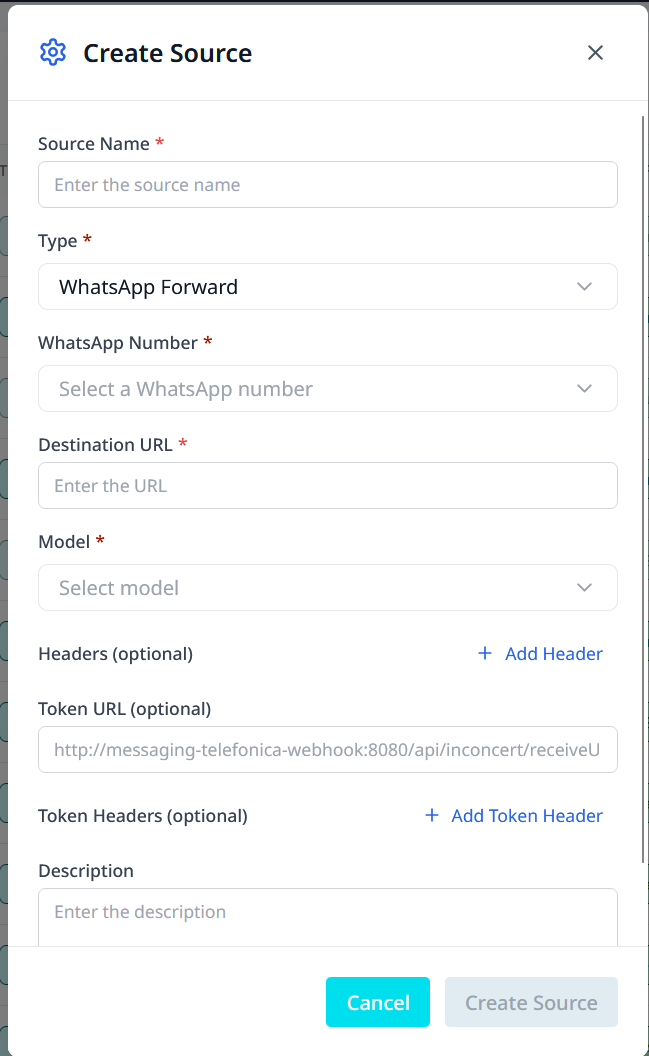
3. Complete the form as shown below.
Create Source — WhatsApp Forward
### Required fields
| Field | Description |
| ------------------- | ----------------------------------------------------------------------------------------------------------------------------------------------------- |
| **Source Name** | Unique name for operations and reporting (for example `aws-production-forward`). |
| **Type** | Select **WhatsApp Forward**. |
| **WhatsApp Number** | Business number from [Phone Configuration](/syntphony-messaging-portal/messaging-tools/administration/phone-configuration.md). |
| **Destination URL** | Public HTTPS URL that receives forwarded events (for example `https://api.example.com/whatsapp/webhook`). Must be reachable from Syntphony Messaging. |
| **Model** | Payload format used when posting to the destination (see [Forward models](#forward-models)). |
### Optional fields
| Field | Description |
| ----------------- | ------------------------------------------------------------------------------------------------------------------------ |
| **Headers** | Additional HTTP headers on each forward request (for example API keys or trace IDs). Use **+ Add Header** for each pair. |
| **Token URL** | Endpoint Syntphony Messaging calls to obtain a token before forwarding, when your destination requires it. |
| **Token Headers** | Headers sent with the token request. Use **+ Add Token Header** for each pair. |
| **Description** | Free-text notes (environment, owner, related integration). |
The **Create Source** button is enabled only when all required fields are valid.
### Forward models
| Model | When to use |
| ----------------- | ----------------------------------------------------------------------------------------------------------------------------------------------- |
| **Meta Standard** | Default for new integrations. Payload aligns with **WhatsApp Cloud API**–style event JSON. Recommended for AWS Lambda and most custom webhooks. |
| **Inconcert** | Use only when the destination is built for the **Inconcert** payload schema (legacy or partner-specific consumers). |
If unsure, choose **Meta Standard** and validate parsing in your destination service before production.
## Forwarded events
Syntphony Messaging posts WhatsApp activity for the selected number to the **Destination URL**, including:
| Event | Description |
| ----------------- | ----------------------------------------------- |
| Incoming message | End user sent a message to your business number |
| Message sent | Outbound message accepted for delivery |
| Message delivered | Delivery confirmation |
| Message read | Read receipt |
| Message failed | Send or delivery failure |
Configure one source per environment (sandbox vs production) with its own **Destination URL**.
## After creation
1. Confirm the source appears in the source list and is **enabled**.
2. Send a test WhatsApp message to the linked number; verify the destination receives an incoming event.
3. Send a test outbound message through the Syntphony Messaging API; verify status events arrive at the same URL.
4. Monitor your destination for `5xx` responses—Syntphony Messaging may retry according to platform policy.
## Edit or review configuration
1. Open **Source Configuration** and locate the source.
2. Expand or open source details to view **WhatsApp Forward configuration** (destination URL, model, and linked number).
3. Use **Edit Source** to change the destination URL, model, headers, token settings, or description. The linked **WhatsApp Number** cannot be changed after creation; create a new source if you need a different number.
## Operational notes
* **Destination URL** must use HTTPS in production.
* Optional **Token URL** is for outbound authentication to your platform, not for Meta or WhatsApp sign-in.
* WhatsApp Forward sources do not use **Console Direct** or source-level handover schedules in the same way as bot-routed WhatsApp sources; handover behavior is defined by your external system.
* Outbound replies to end users still go through **Syntphony Messaging APIs** unless your architecture documents another supported path.
## Expected outcome
* WhatsApp events for the selected number are forwarded to your **Destination URL**.
* Your external platform can process conversations and call Syntphony Messaging to send replies.
* Sandbox and production each use a dedicated forward source and URL.
## Related pages
* [Source Configuration](/syntphony-messaging-portal/messaging-tools/administration/source-configuration.md)
* [Phone Configuration](/syntphony-messaging-portal/messaging-tools/administration/phone-configuration.md)
* [Administration](/syntphony-messaging-portal/messaging-tools/administration.md)
* [Bots Configuration](/syntphony-messaging-portal/messaging-tools/administration/bots-configuration.md) (for standard WhatsApp routing, not forward)
---
# Agent Instructions
This documentation is published with GitBook. GitBook is the documentation platform designed so that both humans and AI agents can read, navigate, and reason over technical content effectively. Learn more at gitbook.com.
## Querying This Documentation
If you need additional information that is not directly available in this page, you can query the documentation by asking a question.
Perform an HTTP GET request on the following URL with the `ask` and `goal` query parameters:
```
GET https://docs-conversational-ai.syntphony.com/syntphony-messaging-portal/messaging-tools/administration/source-configuration/whatsapp-forward-source.md?ask=&goal=
```
`ask` is the immediate question: it should be specific, self-contained, and written in natural language.
`goal` is what the user is ultimately trying to achieve, the reason they need the answer. Sharing it helps GitBook give you a better, more relevant answer. A goal is most helpful when it describes the outcome the user wants rather than restating the question. For example, with `ask=how do I create an API token`, a goal like `automate deployments from our CI pipeline` lets GitBook tailor the answer to that use case.
The response will contain a direct answer to the question and relevant excerpts and sources from the documentation.
Use this mechanism when the answer is not explicitly present in the current page, you need clarification or additional context, or you want to retrieve related documentation sections.